One world.
Many servers.
No seams.

WorldPlane is a hosted multi-server backend for Unreal Engine games. One zone runs across many dedicated servers and looks like one server to your players. Servers join as crowds gather and leave as they scatter, within the budget you set.

  • Seamless handoffs between servers
  • Autoscaling within your budget
  • $100 a month, plus server time

Proven reliability

  • Seamlesshandoffs: no respawns, reconnects or rubber-banding at a border
  • Lightgateway: a small slice of a CPU core per player
  • Resilientzones: a lost server's entities are rebuilt on its neighbours
  • Boundedspend: servers follow load, never past the budget you set

Tested on AWS with players and NPCs crossing server borders under load.

How it works

A zone that spreads itself
across servers

WorldPlane is built on Unreal's own Iris replication and multi-server proxy, and comes to your game as a plugin. Your game keeps its code. WorldPlane decides which server runs which part of the world, and moves the lines as players move.

01Split

One zone, many servers

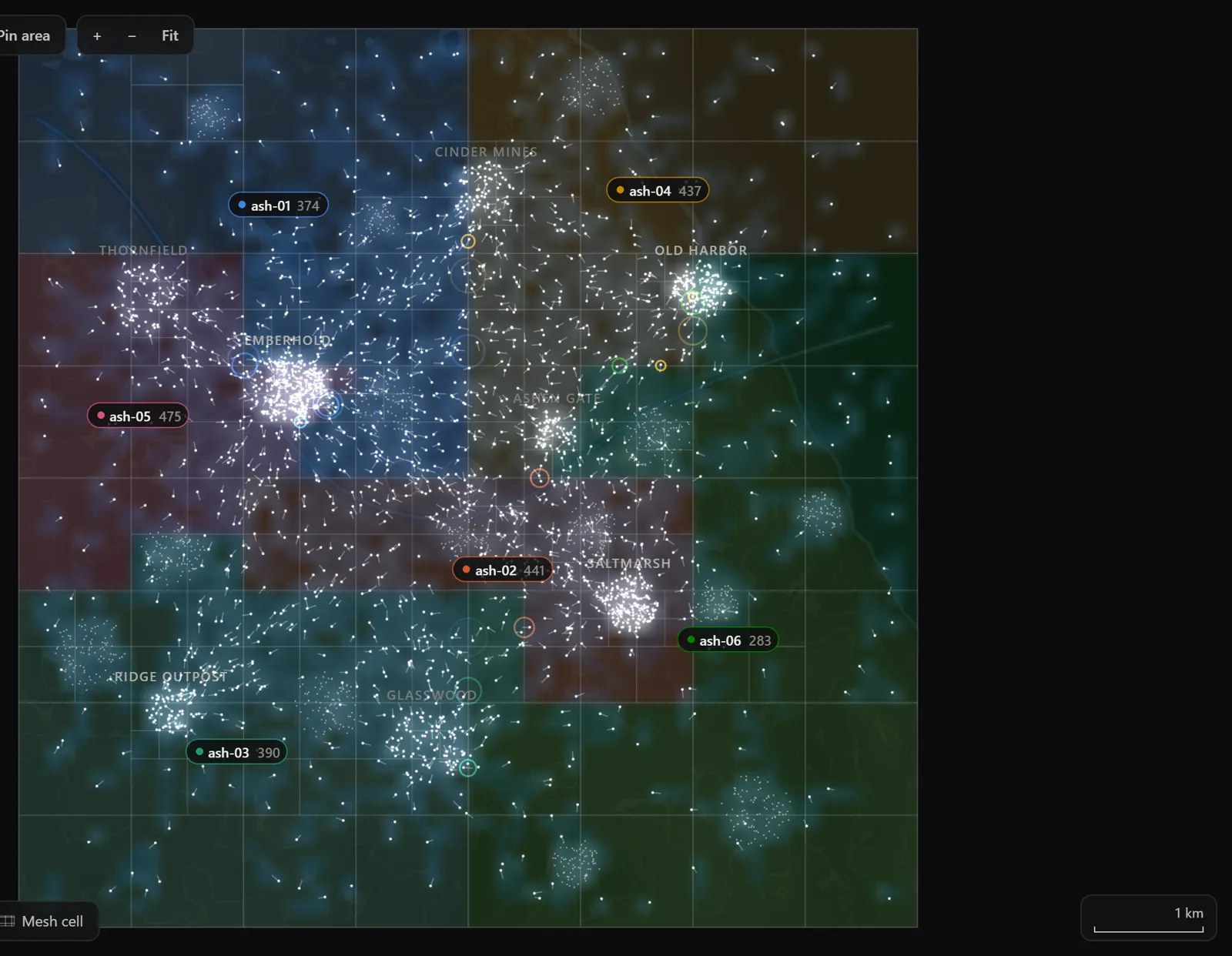
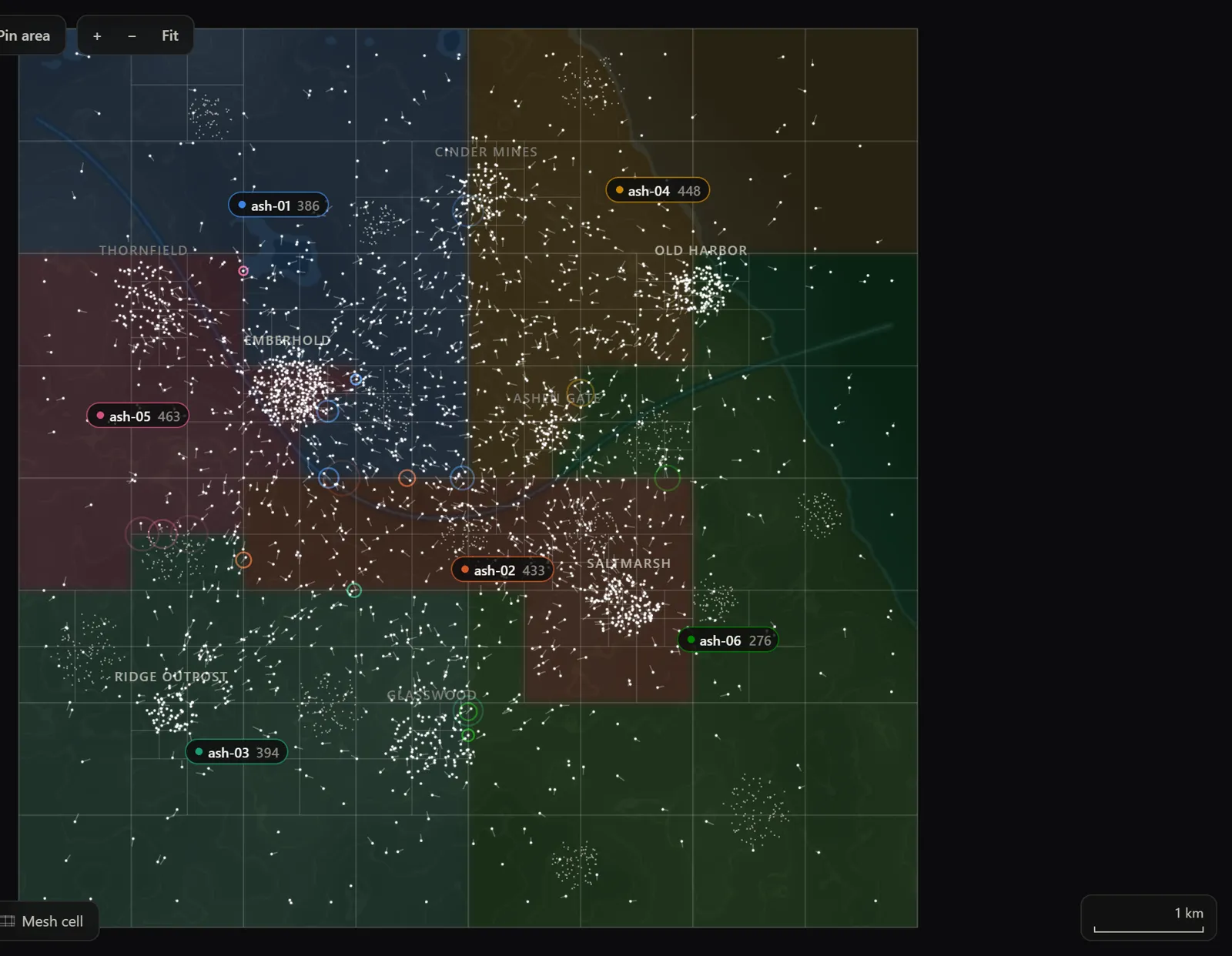
WorldPlane cuts each zone into areas along a space-filling curve and gives each area to a dedicated server. The cuts follow the load: where a crowd gathers, areas shrink, so every server carries its share. The cuts drift toward balance; they never jump.

  • Players and NPCs belong to the server whose area holds them.
  • Entities that are interacting stay together on one server.
  • If a server dies, its entities are rebuilt from checkpoints on the servers that now own their area, and its players stay connected.
02Hand off

Cross a border without noticing

When a player or NPC walks into another server's area, that server takes it over, in memory. There's no respawn, no restart and no loading screen. Near a border, each server keeps live copies of its neighbour's entities, so an NPC on one server fights a player on another, and a hit on a copy is applied by the server that owns it.

No respawns No reconnects No loading screens No rubber-banding
Near a border, each server keeps live copies of its neighbour's players and NPCs.

03Connect

One address in front

Players connect to one address: the gateway. It merges what every nearby server sends into one stream for each player, and at a handoff it moves the player's route to the new server without dropping the connection.

  • Players never need to know which server they're on.
  • A small slice of a CPU core per player.

04Scale

Servers follow the crowd

Start small. When a crowd gathers, WorldPlane brings in a server and hands it half of the busiest area; when the crowd leaves, it drains servers and stops them. It never runs more servers than your hourly budget pays for.

Keep a spare server warm so a split happens at once, or keep none and pay only for what runs; a split then waits a minute or two for a server to boot.

05Sleep

Empty zones sleep for free

When nobody has played for a while, a zone can go to sleep: its servers and gateway stop, and nothing is billed. Your launcher or login service calls one wake endpoint, and the zone answers with its gateway's address once players can connect.

Time is compressed here. From cold, a zone takes a few minutes to wake: a node boots and your server loads.

Atlas

Watch your world, live

Atlas puts every player and NPC in a zone on a live map in your browser, coloured by the server that owns it. It's part of the panel: a running zone opens in Atlas.

Atlas
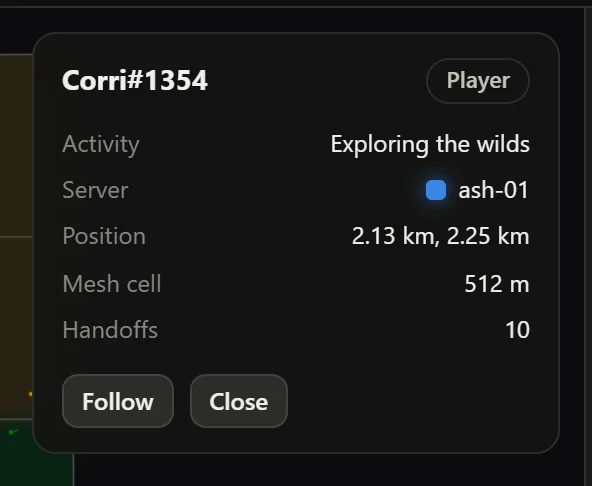
Atlas's inspector for one player: activity, server, position, mesh cell and 10 handoffs, with Follow and Close buttons.

Atlas running its built-in simulation.

  • Coloured by owner

    Every server's area, and every entity it owns, in that server's colour.

  • Handoffs as they happen

    Each crossing shows on the map the moment it happens.

  • Replay

    Scrub back through recent history to see what happened, and where.

  • Inspector

    Click any entity for its owner, its handoffs and what servers logged about it.

Your game stays yours

Plain Unreal code, across servers

Add the plugin and keep writing Unreal. A reference to an entity on another server arrives as this server's copy of it, of its own class, so your casts and interfaces keep working. A call that changes it runs on the server that owns it, with a line of config or one line of code.

  • Built on Iris and Unreal's multi-server proxy.
  • Your accounts, database and services stay yours.
  • worldplane check lists what to change in your project before you upload.
MyCharacter.cpp
// Your attack, unchanged. The target can live on another server:
// it arrives as this server's copy, of its own class.
void AMyCharacter::ServerAttack_Implementation(AActor* Target)
{
    if (AMyNpc* Npc = Cast<AMyNpc>(Target))
    {
        UGameplayStatics::ApplyDamage(Npc, 25.f, GetController(), this, nullptr);
    }
}

// The one line a pawn adds: damage to a copy runs on its owner.
float AMyNpc::TakeDamage(float Damage, const FDamageEvent& Event,
                         AController* By, AActor* Causer)
{
    if (WorldPlane::ForwardDamageToOwner(this, Damage, Event, By, Causer)) return Damage;
    return Super::TakeDamage(Damage, Event, By, Causer);
}

Ship it

From packaged build to running zone

Use the panel, the API or the worldplane CLI. Builds and deploys run from CI with an API key.

  1. 1

    Package a Linux server

    Your game, with the WorldPlane plugin enabled.

  2. 2

    Push the build

    Every build is checked first: the server script, an x86-64 binary, the plugin's version, and no secrets. WorldPlane then images it and starts it once to be sure it runs.

  3. 3

    Deploy

    Pick an environment and deploy. The zone's coordinator starts its servers and gateway.

  4. 4

    Watch it in Atlas

    Open the running zone from the panel.

Terminal

For studios

Made for a team of three
or a team of three hundred

Indie teams

Make a world bigger than one server, without building the backend for it.

  • $100 a month, then pay by the minute for the servers that run.
  • Empty zones sleep and use no server time.
  • Player accounts built in, if your game has none of its own.
  • One CLI from packaged build to live zone.

Large studios

Run many games and many teams, with control over who does what.

  • Organisations, projects, and environments for dev, test and prod.
  • Roles: owner, admin, operator, developer, viewer and billing.
  • API keys for CI, an audit log, and two-factor sign-in.
  • Per-zone budgets and a monthly spend limit.
  • Organisations & projects
  • Dev, test & prod environments
  • Six roles
  • API keys
  • Audit log
  • Two-factor sign-in
  • Password reset by email
  • Optional player accounts

Pricing

One subscription, then server time

A monthly subscription for your studio, plus the server time your zones use, by the minute. Both are billed monthly through Stripe.

Studio

$100 a month

For studios and projects with under $1M in annual revenue or budget.

  • One subscription per organisation, for all its projects
  • The panel, Atlas, the API and the worldplane CLI
  • Unlimited members, environments and API keys
  • Server time at the rates below
Subscribe

Enterprise

Custom

For studios and projects with $1M or more in annual revenue or budget.

  • Everything in Studio
  • Terms, pricing and support agreed with you
  • Help planning capacity for your launch
Contact us

Server time

Every server and the gateway count while they run, at the size you choose. A sleeping zone uses no server time.

Standard

1 vCPU · 2 GiB

$0.20 an hour

Plus

2 vCPU · 4 GiB

$0.40 an hour

Max

4 vCPU · 8 GiB

$0.80 an hour

Estimate a month

Server size

While running

$0.80 an hour

About

$244

a month, with the $100 Studio subscription

Server time includes the gateway, at the same size. The zone sleeps the rest of the day. Real server counts follow your players; you pay for the minutes that run.

  • Budgets. Give each zone an hourly budget; the autoscaler stays inside it.
  • Spend limit. A monthly limit for your organisation stops new deploys once it's reached.
  • Spare servers. Optional. They run, and are billed, like any server.
  • Where. AWS, US East (Ohio). More regions later.

Who makes it

Built by a game studio, for game studios

WorldPlane is made by Artisan Gameworks Inc., a Canadian game studio. We build it alongside Exordium, our own game, and we're opening it to other studios in early access.

FAQ

Questions studios ask

Which engines does WorldPlane support?

Unreal Engine 5.8, through a plugin built on Iris replication and Unreal's multi-server proxy. Other engines are planned.

Do I have to rewrite my game?

No. You enable the plugin, add its entity component to the actors that move between servers, and keep your gameplay code. A pawn's damage takes one line, and world-visible events sent with NetMulticast become replicated state. worldplane check lists what to change.

My game has its own accounts and backend.

Keep them. WorldPlane runs your world; your login, database and services stay yours. If your game has no accounts of its own, WorldPlane's optional player accounts give each environment sign-in, with signed tokens your zones can check.

How many players can one zone hold?

A zone grows by adding servers, so its capacity follows your budget rather than the limits of one machine. Tell us what your game needs at info@artisangameworks.com and we'll help you size it.

Where does it run?

On AWS, in US East (Ohio). More regions will follow. Each environment is its own WorldPlane instance, with its own servers, gateway and budget.

How am I billed?

Monthly, through Stripe: the $100 Studio subscription for your organisation, plus server time by the minute. Every server and the gateway count, at the size you choose. Budgets, a spend limit and sleeping zones keep the bill where you want it. Studios and projects with $1M or more in annual revenue or budget need an Enterprise agreement; write to info@artisangameworks.com.

What does early access mean?

WorldPlane works end to end: sign up, subscribe, add your game, upload a build and deploy. It's new and still changing, so we work closely with the first studios on it. Tell us about your game at info@artisangameworks.com.

Build a world without server walls

Register to set up your studio, add your game and deploy your first zone. Questions first? Write to us.